BitMap Shape capture system
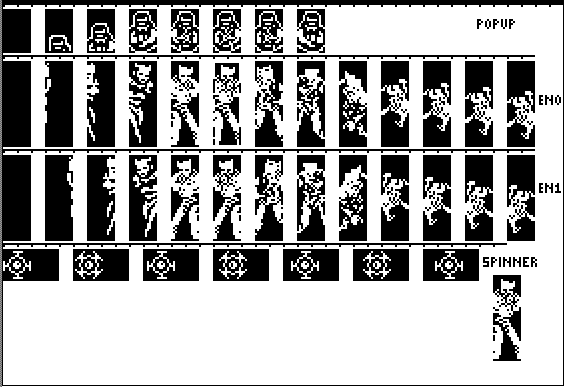
BitMap Shape capture system
*********************************************************
                 January 18, 2006

This set of programs allows you to:
1)convert BMP's to hgr images
2)capture the shapes off the hgr screen
3)make a preshift table suitable for display by the
graphically speaking display code
4)view the preshifted animations

I use microsoft PAINT to edit the images.  You can use
an apple II paint program if you wish.


table driven HGR access is easy:

make the table:
https://rich12345.tripod.com/prog/lookupgen.html

make the graphics:
https://rich12345.tripod.com/bse/index.html

draw the shapes on screen:
https://rich12345.tripod.com/srccode/graphic.html

SCRN function for HGR screen:
https://rich12345.tripod.com/prog/hirescrn.html

allows you to capture graphics off the Hires Screen for
use with included HIGH speed graphics driver...  The
graphics to HGR code came from Graphically Speaking book.
This method of animation is called "animation of preshifted
shapes"... See the book Graphically Speaking, Chapter 12,
Animation of Preshifted Shapes.
the book is available on CD at:
https://rich12345.tripod.com/techcd/index.html
*********************************************************
includes:
1)capture program for capturing bitmaps from HGR screen
2)addshapes program for appending many bitmaps into a table
3)basic program to draw borders around shapes, makes
 it easier to draw and edit shapes
4)a2loadbmp by Tom Green, which allows you to load
 280*192 monochrome bitmaps on the apple II..
*********************************************************
*********************************************************
Capture Features:
moveable shape preview window,
"clipboard" view window (moveable)
select lasso,
copy command
paste command
select lasso is now in assembly,
stores directly to graphics RAM
instead of HPLOT.

runs just as fast as "quickshapes"
now (a softdisk publication)
all memory copies are done with assembly
a shape preview is shown on screen as well
(all in assembly)
runs just fine on a real unaccelerated II
*********************************************************
*********************************************************
command list:
simple animation sequences can be saved,
reloaded to view later.. this is just a hack
of the program calling it's own input routines,
press:

-W-
ASD = cursor size
-I-
JKL = cursor movement
hold CONTROL to move or resize FAST
9 to set CONTROL cursor movement
8 to set CONTROL cursor resize
5 to set animation parameters, type in number of cells
6 to view animation
3 to save animation
4 to load animation
1 to load HGR image
2 to capture shape (enter filename)
*********************************************************


*********************************************************
                     UPDATE
                 August 08, 2012
*********************************************************

check it out online

boot the disk, press return when "copyright" notice is displayed.
press 1 to capture/animate shapes

when capture is loaded, press 1 to load an HGR picture.  Type in
ALLCAPS as the filename and press return.

press 4 to load animation.  type in one of the following for animation
name:

1)popup
2)en0
3)spinner

the animation will be played upon loading.  Press 6 to replay the
animation


email me if you want the source code for this stuff
